Article verified for Release 15.2 on February 26, 2026.
Preparing for proctored tests involves carefully considering technical aspects to ensure a smooth and dependable experience. In this detailed guide, we’ll review the essential technical requirements for successfully executing proctored testing.
Technical Requirements
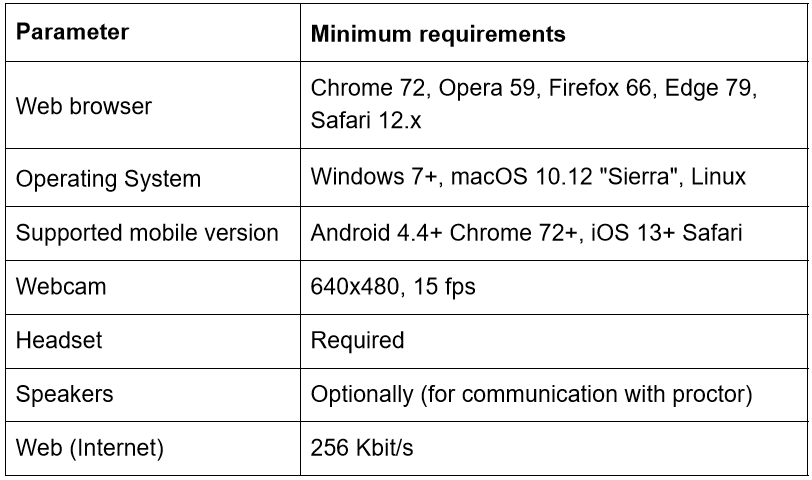
The technical requirements for the proctoring system are summarized in the table below:
Pre-Event Checks
To help ensure a smooth testing experience, we recommend verifying that your webcam, microphone, and internet connection are working properly before the exam. You can perform these checks using the links below:
Proctoring Via Mobile Device
It is possible to take proctored tests on mobile devices, including smartphones and tablets.
There are certain limitations due to mobile platform restrictions. Specifically, mobile browsers do not support screen recording, so it is not possible to capture videos or screenshots of the test-taker’s screen.
All activity metrics remain fully functional. For example, if a test-taker opens another browser tab, the corresponding violations (b1, b2, b3) will still be recorded. During the test, the test-taker will see a small pop-up notification whenever a violation occurs
For more useful instruction materials, please check the following links: