YouTestMe Proctoring
YouTestMe
Enterprise Proctoring
AI-powered monitoring and live supervision to protect exam integrity at scale. Verify identity, detect suspicious behavior, and review flagged sessions. Deploy with GetCertified or integrate with your existing LMS.
How Proctoring Works: From Setup to Review
A four-step workflow built for security, transparency, and exam integrity.
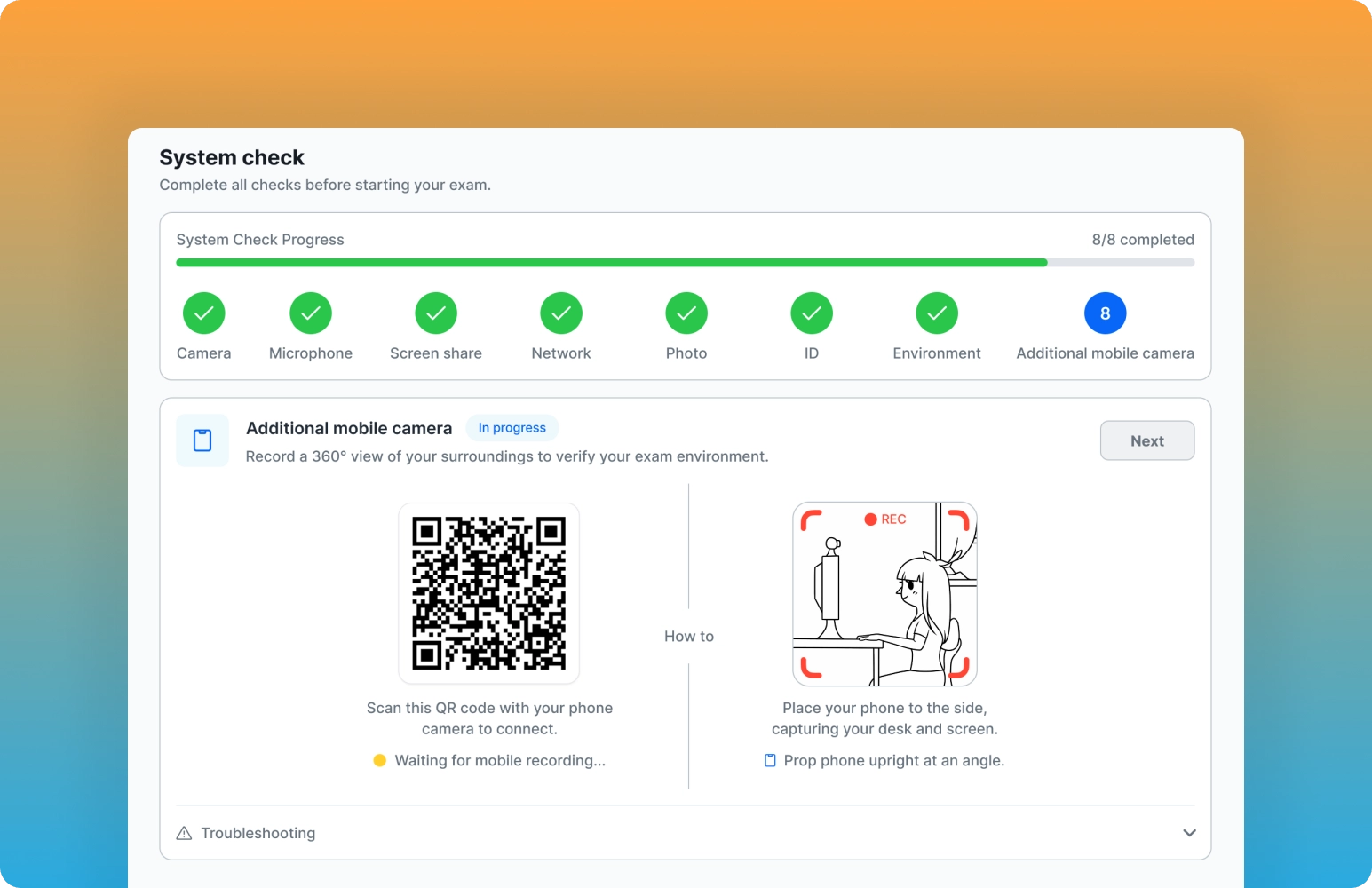
Equipment Check
Before the exam begins, the system verifies each candidate's camera, microphone, screen sharing, and network connection. Clear status indicators and guided troubleshooting help resolve issues before they cause disruptions.
- Automatic camera, microphone, and screen sharing checks before the exam.
- Network stability verification to prevent connection issues during the session.
- Visual indicators show which components are ready or need attention.
- Step-by-step troubleshooting helps candidates fix problems quickly.
Identity Verification
The system confirms each candidate's identity by matching their ID document with a live camera capture. Proctors and administrators see clear verification statuses for a transparent, auditable process.
- Candidates capture a photo of their ID or upload an existing document.
- Automatic comparison of the ID photo with the live camera image.
- Real-time verification status displayed inside the proctor interface.
- Secure, auditable identity checks that support compliance requirements.
Identity Verification
The system confirms each candidate's identity by matching their ID document with a live camera capture. Proctors and administrators see clear verification statuses for a transparent, auditable process.
- Candidates capture a photo of their ID or upload an existing document.
- Automatic comparison of the ID photo with the live camera image.
- Real-time verification status displayed inside the proctor interface.
- Secure, auditable identity checks that support compliance requirements.
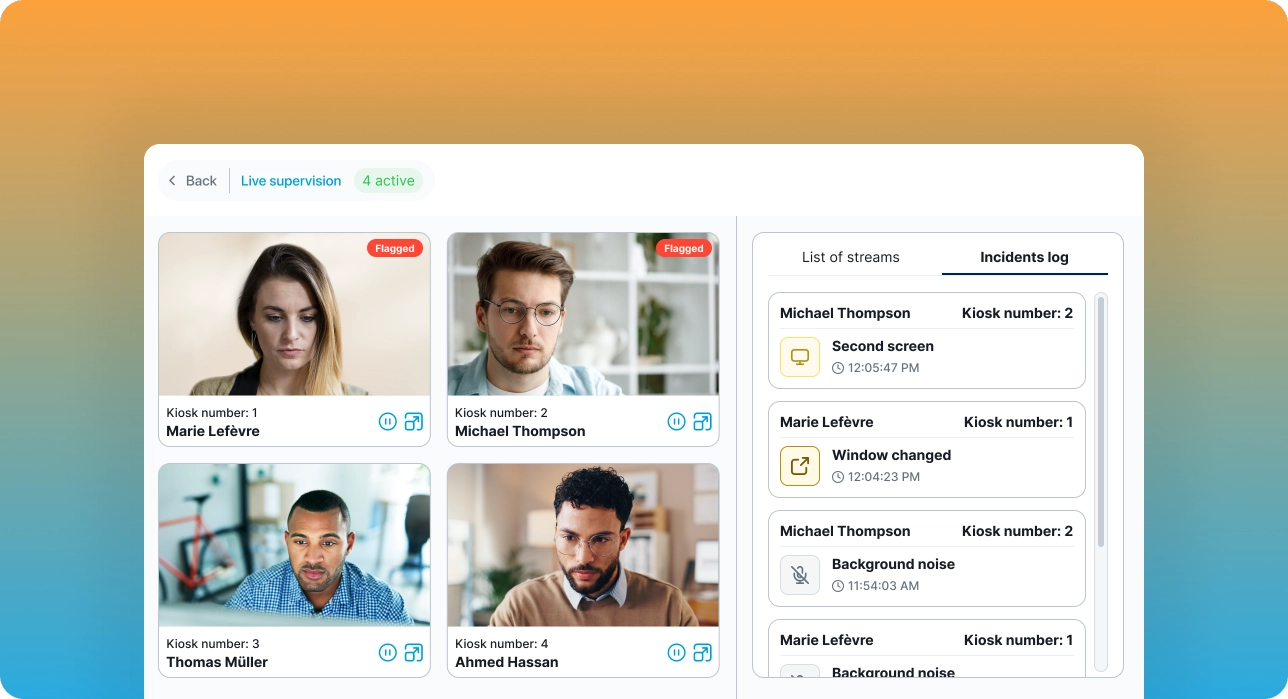
Live Proctoring
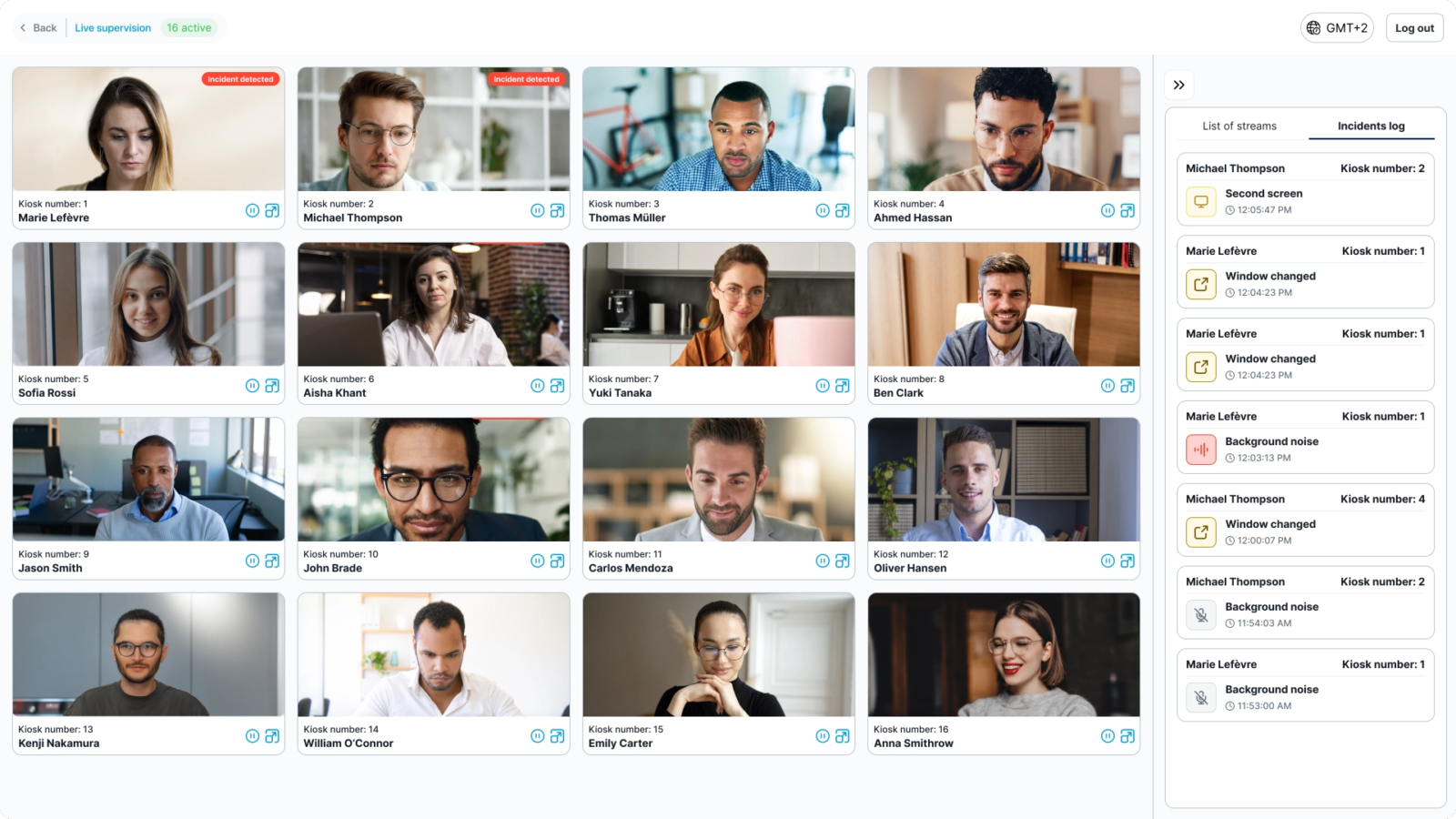
Proctors monitor candidates in real time through camera, audio, and screen sharing, with AI-assisted detection highlighting suspicious activity. Multi-candidate views and live alerts keep oversight focused and efficient.
- Real-time monitoring of candidate video, audio, and screen.
- AI-assisted detection highlights suspicious or risky behavior.
- Multi-candidate layout lets proctors supervise several exams at once.
- Live alerts and event markers keep proctors focused on critical moments.
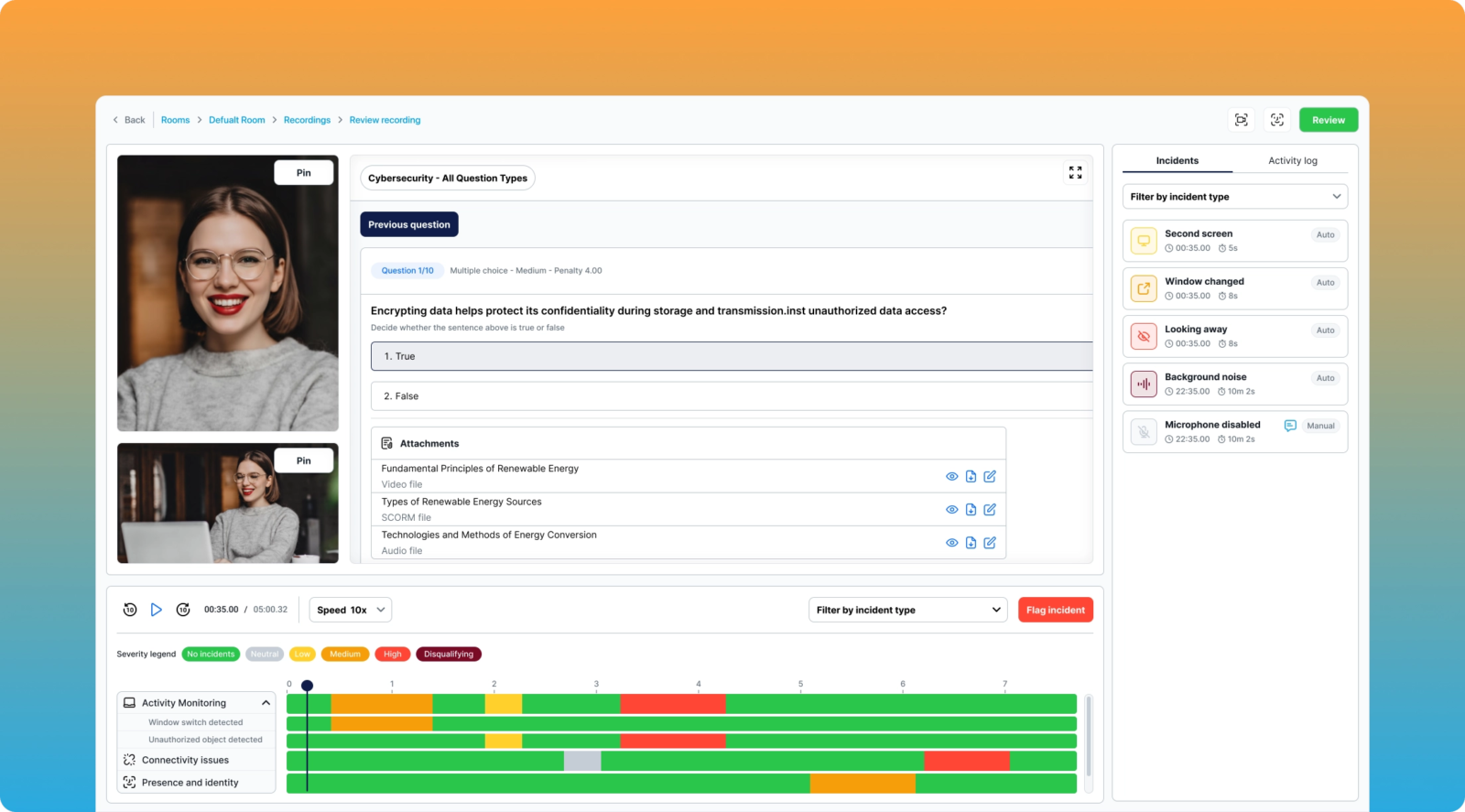
Review Recording
After the exam, replay the full session using dual-camera recordings and a color-coded timeline. AI flags and event markers are highlighted so reviewers can investigate incidents quickly and document exam integrity.
- Dual-camera playback shows both the candidate and shared screen.
- Interactive timeline with clearly marked incidents and events.
- AI-detected events are highlighted to speed up post-exam review.
- Full audit trail for compliance, reporting, and governance.
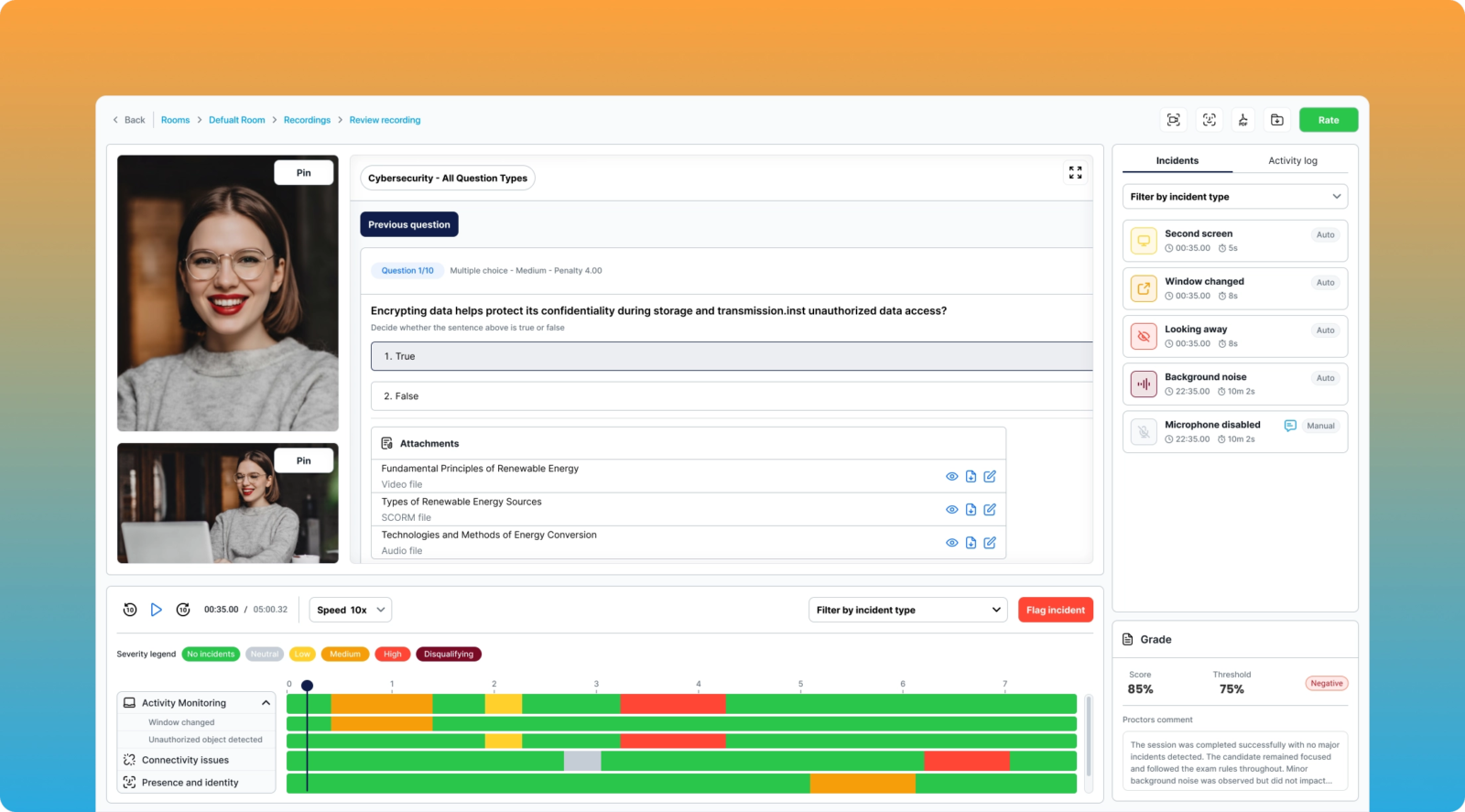
Review Recording
After the exam, replay the full session using dual-camera recordings and a color-coded timeline. AI flags and event markers are highlighted so reviewers can investigate incidents quickly and document exam integrity.
- Dual-camera playback shows both the candidate and shared screen.
- Interactive timeline with clearly marked incidents and events.
- AI-detected events are highlighted to speed up post-exam review.
- Full audit trail for compliance, reporting, and governance.
Choose the Proctoring Model That Fits Your Security Requirements
Flexible options from fully automated AI monitoring to human-supervised live proctoring.
Automated Proctoring
Most PopularAI monitors the exam in real time and flags suspicious behavior with accurate timestamps for post-exam review.
How it works:
- AI analyzes video, audio, and screen activity in real time.
- Detects extra faces, tab switching, and focus changes.
- Generates a post-exam credibility report with flagged incidents.
- No human proctor required during the exam.
Ideal for: Large-scale or mid-stakes exams
Live Proctoring
Maximum SecurityCertified human proctors monitor exams in real time, assisted by AI alerts that focus their attention on suspicious behavior.
How it works:
- Human proctor watches the live video feed during the exam.
- AI provides instant alerts for suspicious activity.
- Proctor can intervene via chat or voice in real time.
- Supports real-time decision making and candidate communication.
Ideal for: High-stakes or regulated exams
Record and Review
Most FlexibleExams are recorded and reviewed later by your administrators or YouTestMe staff. Candidates can test on their own schedule.
How it works:
- Full session recording: video, audio, and screen capture.
- Candidates take exams anytime without scheduling a proctor.
- Review recordings at your convenience.
- AI pre-flags suspicious moments for faster review.
Ideal for: Flexible scheduling requirements
Additional Camera: 360° Monitoring
Add-onAdd a smartphone as a second camera for complete room coverage. Connects instantly via QR code.
How it works:
- Scan a QR code to connect a smartphone camera.
- 360-degree environment view alongside the main webcam feed.
- Compatible with all three proctoring models above.
- No additional software installation needed.
Ideal for: Enhanced security requirements
Custom Proctoring and AI-Powered Monitoring
Tailor your proctoring setup to your requirements and enhance supervision with real-time, AI-driven alerts.
ProCTool Custom
A tailored proctoring configuration that matches your requirements, adapts to your testing workflows, and ensures a smooth, secure experience for candidates.
Accessibility Accommodations
Customized accommodations for candidates with disabilities or accessibility needs.
1:1 Proctor Sessions
Dedicated personal proctor for high-stakes or sensitive exams.
Accommodation Setup
Exam environment configured according to your specific requirements.
Client-Specific Workflow
Proctoring steps aligned with your internal processes and policies.
Dedicated Implementation Support
Guided setup, testing, and optimization of your proctoring workflow.
AI-Based Alerts and Events
Automated monitoring that helps proctors identify risks quickly, review flagged moments, and maintain a secure exam environment with minimal manual effort.
Face Detection
Flags missing, obscured, or unauthorized faces to verify candidate presence.
Multiple Users
Alerts when extra faces appear on screen during the exam.
Screen Monitoring
Identifies unauthorized pages, applications, or focus changes.
Audio Detection
Highlights unexpected noise, background conversations, or mute issues.
Connection Tracking
Reports network drops or connectivity status changes during the session.
Three Integration Options. Deploy in Minutes.
Choose the integration method that fits your technical requirements and timeline.
SDK Integration
AdvancedFull API access with complete customization. Build your own UI and workflows using the YouTestMe SDK.
- Complete control
- Custom workflows
- Advanced features
- Developer support
LTI Integration
StandardIndustry-standard LTI protocol for seamless integration with any LMS platform. Most popular choice.
- LMS compatible
- Quick setup
- Zero coding
- SSO ready
iFrame Embed
SimpleThe fastest integration method. Embed the proctoring interface directly into your platform with a single code snippet.
- Copy and paste
- No backend needed
- Instant setup
- Mobile friendly
Lockdown Browser and LMS Integration
Strengthen exam security with Safe Exam Browser support and add proctoring to Moodle without changing your workflow.
Safe Exam Browser (SEB)
Full lockdown browser support to prevent unauthorized access and ensure maximum exam security.
Full Lockdown Mode
Prevents unauthorized access to applications and websites during exams.
Enhanced Security
Blocks task switching, screenshots, and external applications.
Built-In Compatibility
Works directly with YouTestMe proctoring features.
Cross-Platform
Available for Windows, macOS, iOS, and iPadOS.
Moodle Integration
Add proctoring to your Moodle courses without changing your workflow.
Native Plugin
Integrates directly with your existing Moodle environment.
Quick Setup
Deploy proctoring for Moodle quizzes in minutes.
Unified Experience
Students stay inside Moodle throughout the exam. No redirects, no disruption.
Flexible Configuration
Customize proctoring settings per quiz or course.
Enterprise-Grade Data Protection
Security and compliance built into every layer
ISO 27001 & 9001 Certified
Standards for secure and quality information management
GDPR Compliant
Full compliance with European data protection regulations
Encrypted Data
Data encrypted at rest and in transit with industry-standard protocols
Flexible Deployment
Cloud, private cloud, or on-premise hosting options
Regional Hosting
Configurable data retention and regional data storage options
Experience It First-Hand
Explore how the platform works through a guided demo or schedule a call with our team to walk you through key features and use cases. Schedule a Call