Article verified for Release 15.2 on January 5, 2025.
This article explains how to enable and configure Polling and Web Sockets, two synchronization methods used to keep the server and client in sync during test execution.
Understanding Web Sockets and Polling
Web Sockets and Polling settings are pivotal for ensuring real-time updates and data retrieval within specific monitoring dashboard features, including:
- Pause/Resume attempts.
- Adding extra time to an attempt.
Here, we delve into the two synchronization methods:
- Web Sockets: This method involves the server instantly pushing events to the client. However, network settings may occasionally block web sockets. In such cases, it’s prudent to use polling alongside web sockets.
- Polling: With polling, the client periodically checks for new server events at specified intervals. This method ensures event delivery even when web sockets are obstructed.
Configuring Web Sockets and Polling
To configure Web Sockets and Polling effectively, follow these streamlined steps:
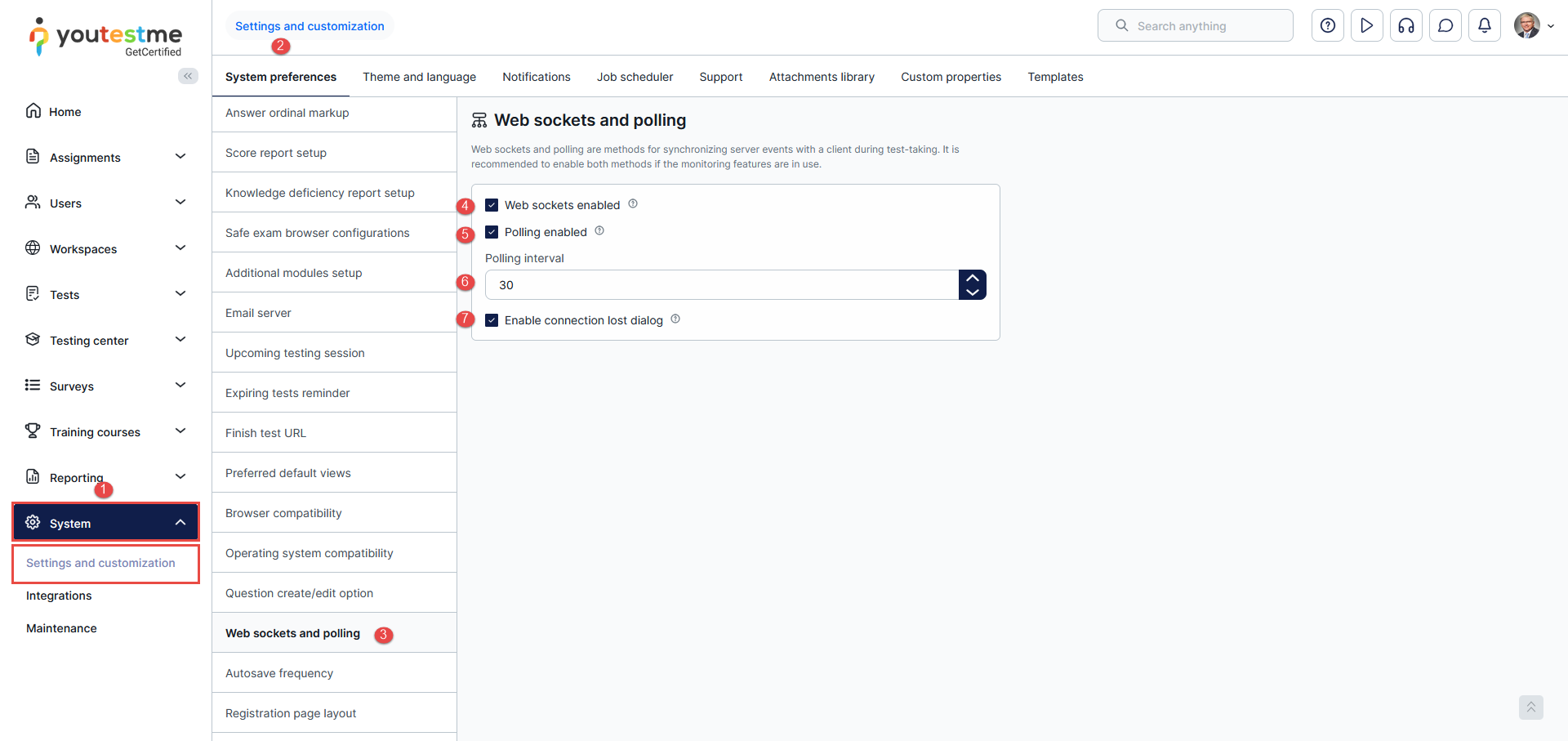
- Click on the System page and select Settings and customization.
- Navigate to the System preferences tab.
- Scroll down and select Web Sockets and polling.
- Web sockets enabled – Enable this option when monitoring is in use. If not, it’s wise to disable it to avoid impacting system performance and capacity.
- Polling enabled – Similar to Web sockets, activate polling if monitoring is enabled. For non-monitoring scenarios, disabling polling prevents any unintended performance impacts.
- Polling Interval – Specify how often the client checks for new server events. An ideal interval is 30 seconds or greater, ensuring optimal system performance.
- Enable connection lost dialog – in case of internet connection problems or unexpected errors during the test taking, the dialog will cover the page until the issue is resolved.
By understanding and configuring Poling and Web sockets with precision, you can optimize your test monitoring, ensuring a seamless experience for both administrators and test-takers.
For more related articles, please visit:






