Article verified for Release 15.1 on December 22, 2025.
This article walks you through the process of enabling username case-sensitivity within your application, allowing users to choose whether their usernames are treated as case-sensitive or not.
Enabling the option
To enable Username case-sensitive option, hover over the System in the main menu and:
- Select Settings and customization.
- Navigate to the System preferences tab.
- Click on the User account settings.
- Enable Username case-sensitive option.
- Select the Confirm button to save the changes.
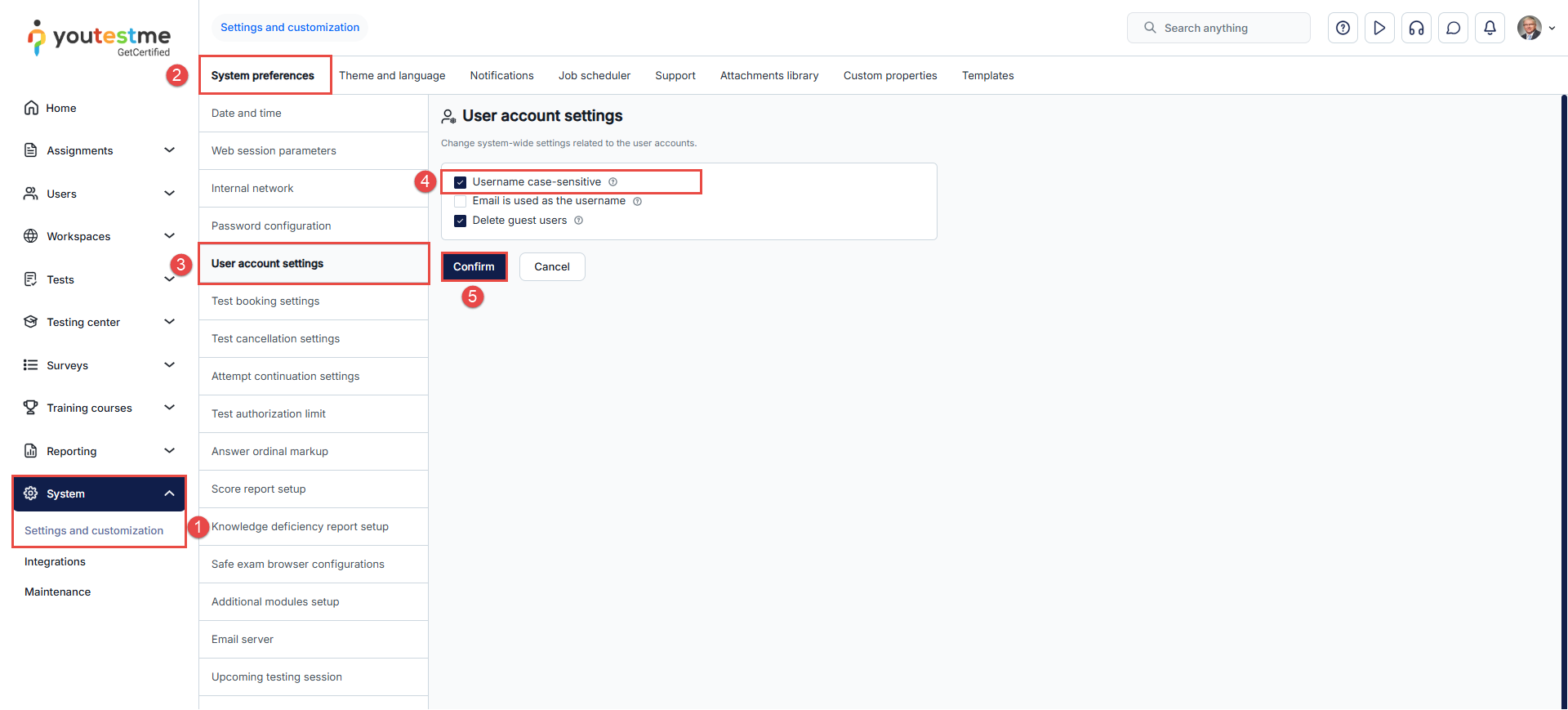
If the username is case-sensitive, the system will allow the creation of new accounts with usernames that only differ in capitalization. The option for case-sensitive usernames offers greater username availability, user flexibility, and support for various naming conventions, while maintaining consistency and minimizing the risk of conflicts.
Example scenario
Imagine there are two users, Andy.Connor123 and andy.connor123, who both want to join your application. If case sensitivity is disabled, the system would consider Andy.Connor123 and andy.connor123 as the same username. This could potentially cause conflicts and confusion.
However, with case sensitivity enabled, the system takes a different approach:
- Creation of Accounts: Users can now create accounts with usernames that differ only by case. For instance, Andy.Connor123 and andy.connor123 can both coexist within the system, each with its distinct capitalization.
- Preservation of Existing Accounts: Even if you decide to change the case-sensitivity setting after the fact, existing accounts remain unaffected. Accounts with identical lowercase usernames, such as Andy.Connor123 and andy.connor123 will still coexist, and the setting change won’t disrupt their existence.
- Log-In Procedure: Here’s where the twist comes in. Regardless of whether case-sensitivity is enabled or disabled, during login, users must enter their usernames with the exact letter case they registered with. This means that if a user signed up as Andy.Connor123, he must log in using the same capitalization (Andy.Connor123) to access his account, even if the system settings change.
In essence, the case-sensitivity setting allows for more fine-tuned username distinctions. It enhances the potential for creating unique usernames while maintaining the convenience and familiarity of logging in with the correct letter case.






