Article verified for Release 15.0 on November 25, 2025.
This report provides a quick and centralized overview of all tests in the system, including their publishing status, creator information, and creation date. It is especially useful for managers and administrators who need to track which tests are ready for use, which are still in draft mode, and which have been suspended. By reviewing this report, you can better organize upcoming testing activities and ensure that all tests are properly prepared before scheduling sessions.
Steps to Access and Use the Report
-
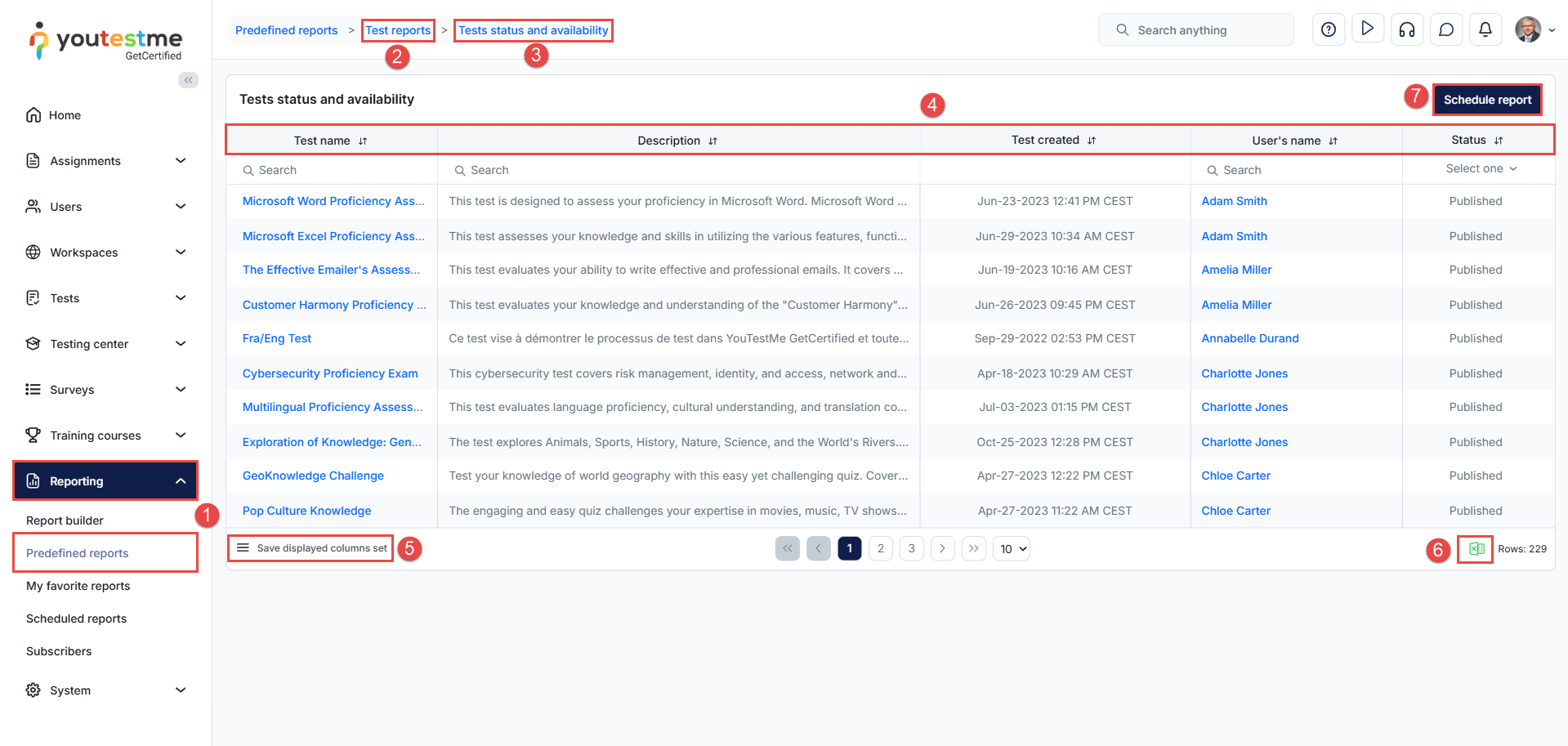
Navigate to the Reporting > Predefined reports – Access the predefined reporting section to view all available reports.
-
From the available report groups – Browse through the list of categorized report groups to locate test results reports.
-
Select Test statuses and availability – This report displays detailed information about every test in the system, including its status and creator details.
-
Review the available columns in the table – The following columns are displayed:
-
Test name – The name of the test.
-
Description – The test’s description, provided during test creation.
-
Test created – The exact date and time when the test was created.
-
User’s name – The name of the user who created the test.
-
Status – Indicates whether the test is Published, Draft, or Suspended.
-
-
Modify the displayed columns and save the table – You can customize the table by selecting which columns to show or hide and save your preferred view.
-
Export as an Excel file – Export the report with your current filters and visible columns. The exported Excel file will reflect only what is currently displayed in the table.
-
Schedule report – You can schedule automatic report delivery to your email.
Note: Filters and column modifications will not be preserved in scheduled reports; they are applied only to on-screen and manual Excel exports.
Conclusion
The Test statuses and availability report gives you full visibility into all tests across the system, helping ensure that each test is up-to-date, properly published, and ready to be used in testing sessions. By customizing the displayed columns, exporting the data, or scheduling periodic updates, you can streamline your administrative workflow and maintain complete control over your test inventory.






