Article verified for Release 15.2 on February 26, 2026.
Preparing for proctored tests involves carefully considering technical aspects to ensure a smooth and dependable experience. In this detailed guide, we’ll review the essential technical requirements for successfully executing proctored testing.
Technical Requirements
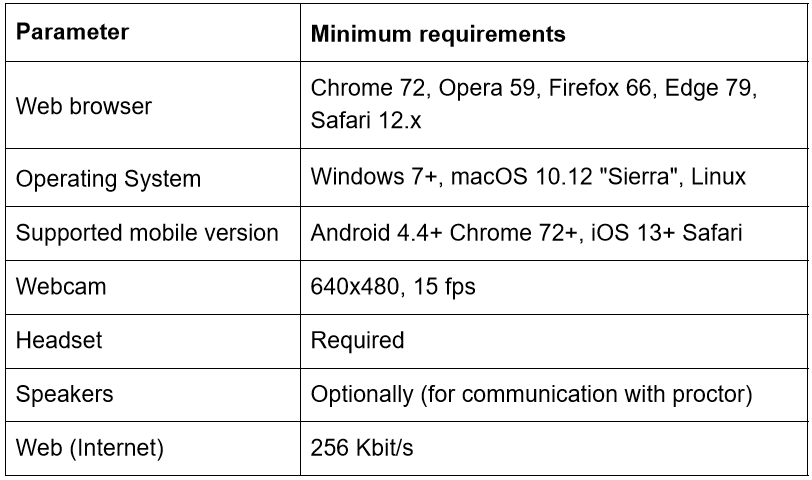
The technical requirements for the proctoring system are summarized in the table below:
Pre-Event Checks
To help ensure a smooth testing experience, we recommend verifying that your webcam, microphone, and internet connection are working properly before the exam. You can perform these checks using the links below:
Note: Proctored Tests cannot be taken on mobile devices. As outlined in the technical requirements, all exams must be completed on a desktop or laptop computer that meets the minimum system specifications (Windows 7 or later, macOS 10.12 Sierra or later, or Linux).
A mobile device may be used solely as a secondary camera if required by the selected proctoring method.
In such cases, the phone, tablet, or iPad is used exclusively for video monitoring and cannot be used to access or complete the test.
For more useful instruction materials, please check the following links:






